The check engine light suddenly glares at you from the dashboard. Your mind races with worst-case scenarios and visions of an expensive repair bill. Many drivers feel helpless in these moments, but a simple diagnostic car code reader puts real power back in your hands.
Learning how to use a diagnostic car code reader transforms you from a worried motorist into a capable troubleshooter. This guide walks you through the entire process step by step. We’ll cover everything you need to diagnose issues confidently and save money on unnecessary shop visits.
Preparing Your Diagnostic Car Code Reader and Vehicle
Start by selecting a quality scanner compatible with your vehicle. Check the supported protocols — most modern readers handle OBD-II systems found on cars from 1996 onward in the US.
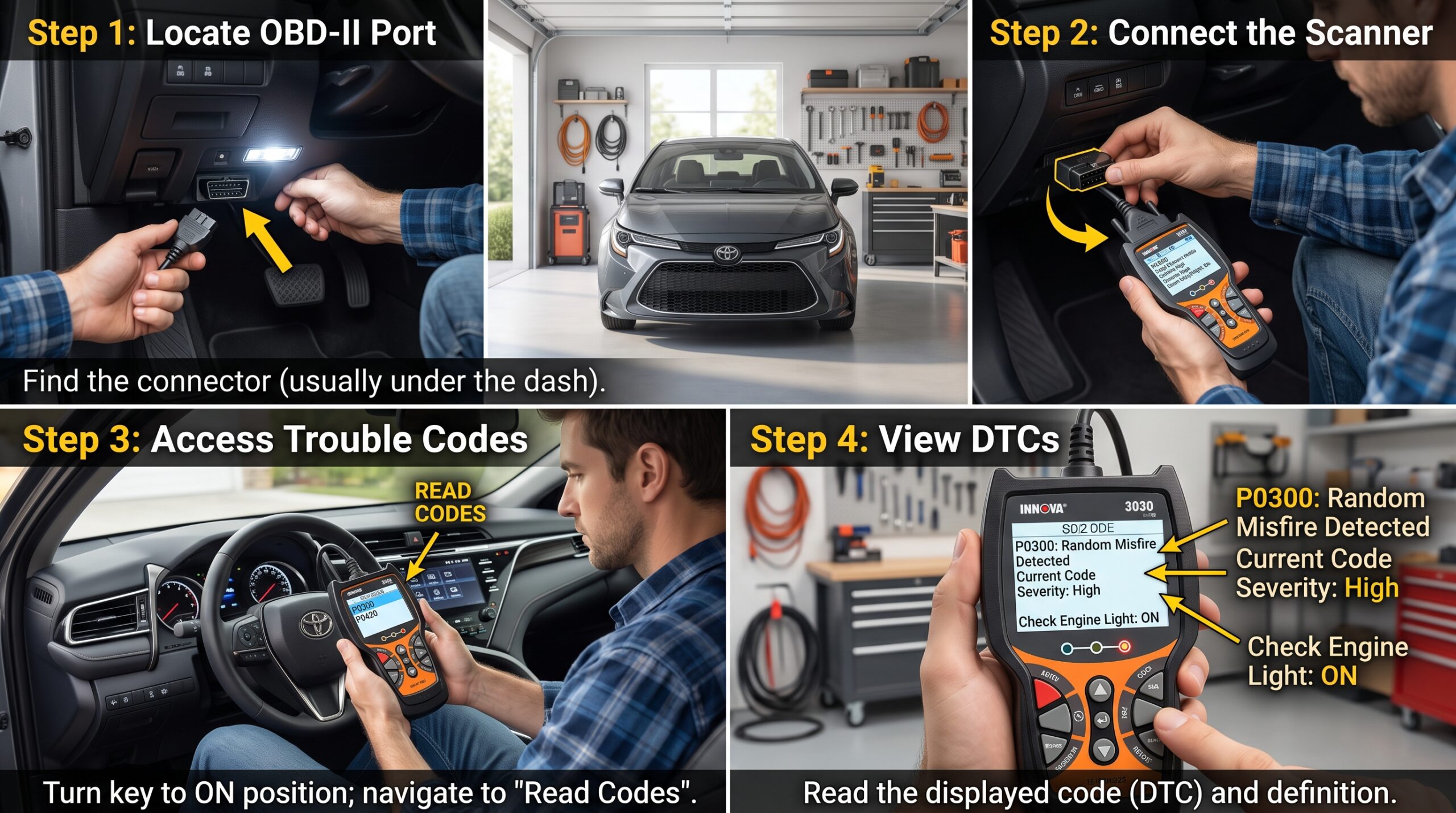
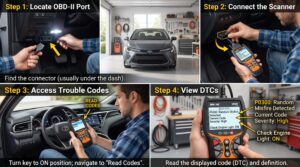
Park your vehicle on a level surface and turn the engine off. Locate the OBD-II port, usually under the dashboard near the steering column. Plug the code reader securely into the port before turning the ignition to the ON position without starting the engine.
In one memorable case, I helped a friend whose scanner wouldn’t connect. A quick inspection revealed a slightly bent pin in the port from previous use. Simple visual checks prevent these frustrating delays.
Reading and Interpreting Diagnostic Trouble Codes
Power on your scanner and allow it to establish communication with the vehicle’s computer. Select “Read Codes” and wait patiently as it scans various modules. Note any pending codes alongside active ones for a fuller picture.
Write down or screenshot every code exactly as displayed. Don’t clear them yet. Research each code using reliable sources or the scanner’s built-in database. Remember that a code like P0301 points to a specific cylinder misfire but doesn’t always reveal the root cause immediately.
Cross-reference codes with your vehicle’s symptoms. A combination of sensor and misfire codes often tells a more complete story than any single code alone.
Advanced Functions and Live Data Monitoring
Many diagnostic car code readers offer bidirectional controls for testing components. Use these features carefully to command items like fuel injectors or EVAP purge valves. This active testing helps confirm whether a part actually responds.
Switch to live data mode to monitor sensor readings in real time. Watch for abnormal values in oxygen sensors, coolant temperature, or short-term fuel trims. Graphing capabilities on better scanners make patterns much easier to spot.
During one late-night diagnosis on my own vehicle, live data revealed a slowly failing thermostat that no static code had triggered yet. Catching it early prevented engine overheating damage.
Clearing Codes and Verifying Repairs
Only clear codes after addressing the underlying problem. Use the “Erase Codes” function once repairs are complete. Drive the vehicle through a complete drive cycle to see if codes return.
Monitor freeze frame data before clearing. It captures conditions present when the code first triggered. This information proves invaluable for replicating issues during testing.
Keep detailed records of every code, repair, and outcome. Over time, these notes become your personal knowledge base for your specific vehicle.
FAQ
Will any diagnostic car code reader work on my vehicle?
Most work on OBD-II compliant cars, but check compatibility with your make, model, and year for best results.
Can a code reader tell me exactly what’s wrong with my car?
It provides valuable clues but often requires additional troubleshooting to identify the root cause.
Is it safe to drive with a check engine light on?
It depends on the code. Some issues are minor while others can cause serious damage if ignored.
How often should I use my diagnostic car code reader?
Use it whenever warning lights appear or during routine maintenance to catch problems early.
Do I need professional help after reading codes?
For simple issues like loose gas caps, no. Complex problems involving multiple systems may still need expert attention.
Start Diagnosing Like a Pro Today
Mastering how to use a diagnostic car code reader empowers you to handle many common automotive issues yourself. The initial learning curve pays for itself quickly through avoided dealer visits.
Pick up a quality scanner that fits your needs and start practicing on your own vehicles. Build your skills gradually and keep learning with each new code you encounter. Your cars will run better and your wallet will stay fuller.